

Yoast SEO Integration & Optimization
Before configuring Yoast SEO, make sure your WordPress site is connected to Ghost.blog. If you haven't connected it yet, follow Connect Your WordPress Site first.
Once your WordPress site is connected, Ghost.blog can integrate with Yoast SEO to analyse generated articles, identify SEO issues, and help optimize your content before publishing.
Step 1: Install and Activate Yoast SEO on WordPress
- Log in to your WordPress Admin Dashboard.
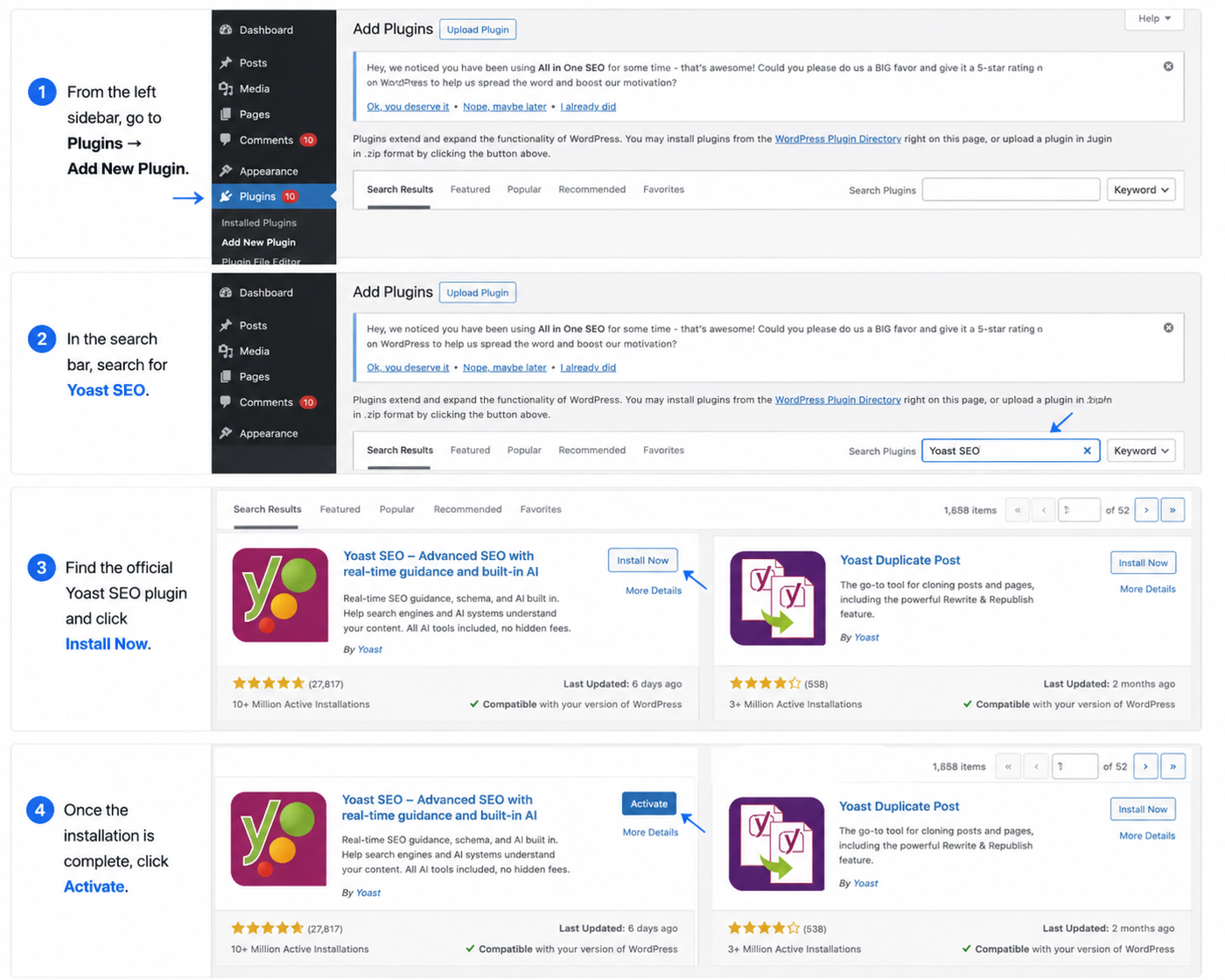
- From the left sidebar, go to Plugins → Add New Plugin.
- In the search bar, search for Yoast SEO. Find the official Yoast SEO plugin and click Install Now.
- Once the installation is complete, click Activate.
- After activation, Yoast SEO will be available on your WordPress website and ready to be connected with Ghost.blog.
Note: If Yoast SEO is already installed and active on your WordPress website, you can skip this step.
Step 2: Connect Yoast SEO
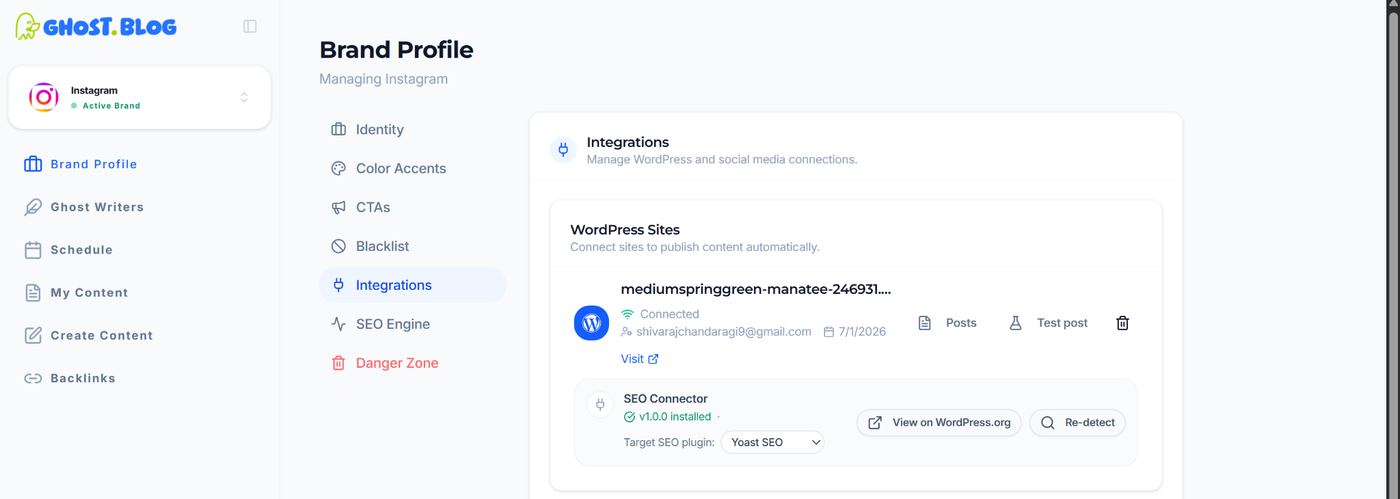
- Go to Brand Profile → Integrations.
- Under SEO Connector, ensure your WordPress site is connected.
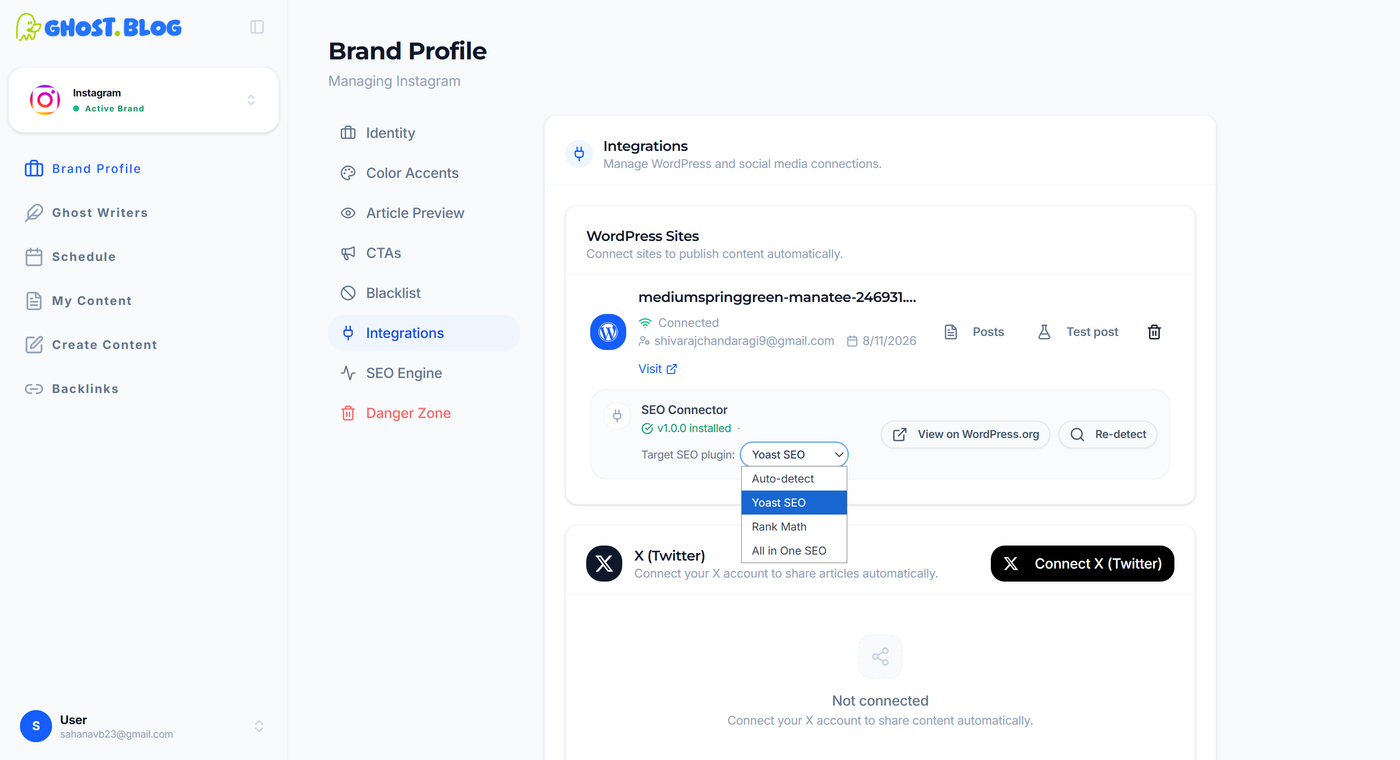
- Locate the Target SEO Plugin dropdown. Select Yoast SEO.
This allows the platform to communicate with your preferred SEO plugin and retrieve SEO analysis for generated articles.
Step 3: Select the Default SEO Engine
- Navigate to Brand Profile → SEO Engine.
- Under Default SEO Plugin, select Yoast SEO.
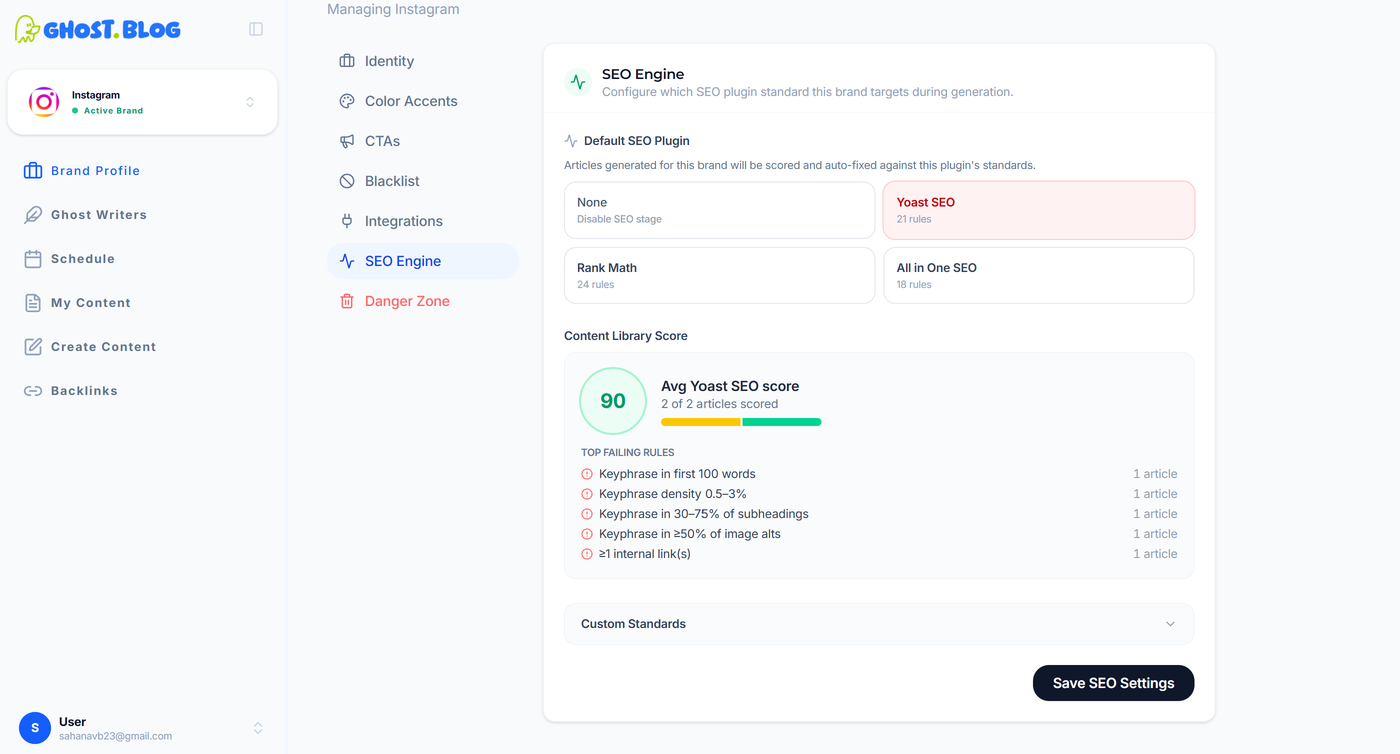
- Click Save SEO Settings to apply your selection.
- Once the SEO engine is selected, the Content Library Score section will display the overall SEO score for your content based on the selected plugin. It also shows the average SEO score, the number of articles analysed, and the top failing SEO rules, helping you identify areas for improvement across your content library.
All newly generated articles will be scored and automatically optimized according to the selected SEO engine.
Step 4: Review and Fix the SEO Variables

- Go to My Content from the dashboard.
- Open one of the generated articles.
- Scroll down to the SEO Analytics section.
- Select Yoast SEO.
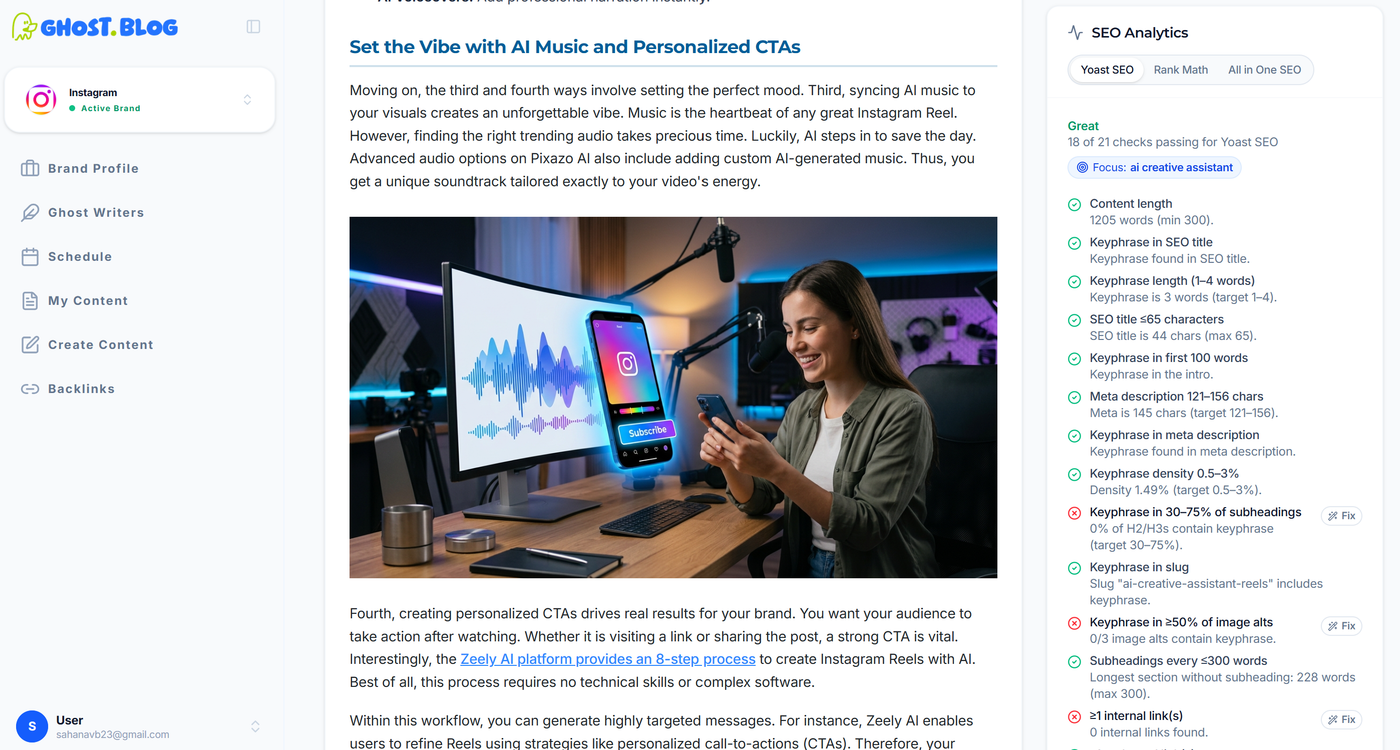
- The selected plugin will display all of its SEO variables along with their pass/fail status. For example:
- Yoast SEO: 21 SEO checks
- Rank Math: 24 SEO checks
- All in One SEO: 18 SEO checks
- Continue scrolling to the bottom of the analysis to review any failed checks.
- Click Fix All Failing Rules to automatically optimize the content based on the selected plugin's recommendations.
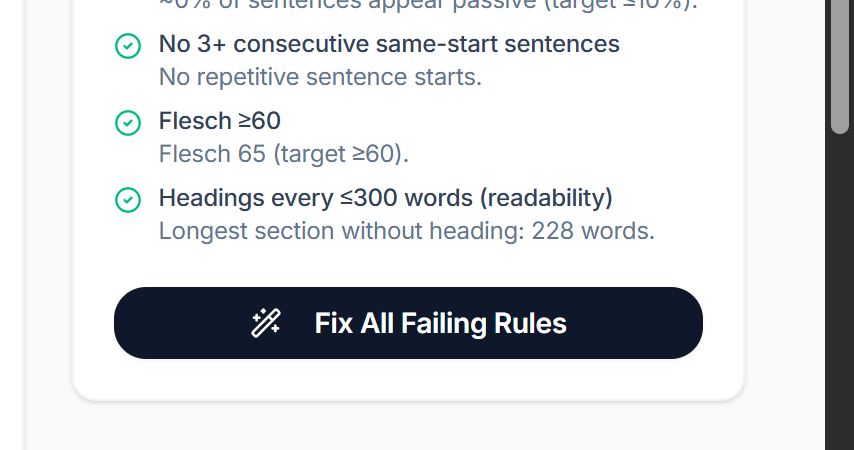
- Once the fixes are applied, re-run the SEO analysis to verify that the article passes more SEO checks and achieves a higher SEO score.
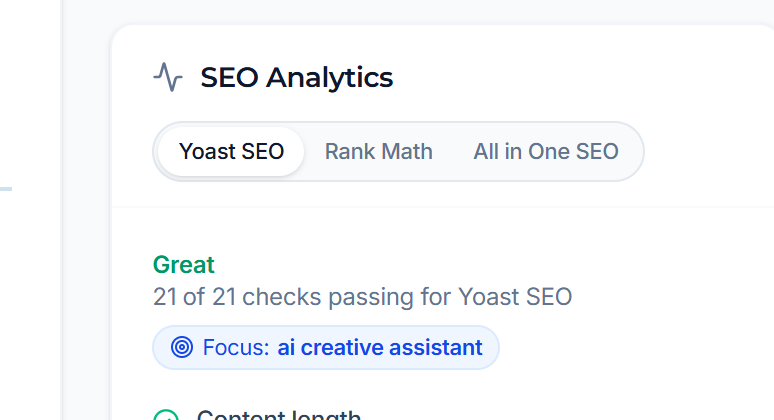
This process helps ensure that each generated article is optimised according to the SEO plugin's recommendations before it is published.
Understanding the Yoast SEO Checks
If you've selected Yoast SEO, your article will be evaluated against 21 SEO best practices. Each check is marked as Passed, Needs Improvement, or Failed, helping you identify areas that can improve your content's search engine performance.
Yoast SEO Check | What it checks |
|---|---|
SEO Title Contains Keyphrase | Ensures your focus keyphrase appears in the SEO title. |
Meta Description Contains Keyphrase | Checks that the focus keyphrase is included in the meta description. |
SEO Title Length | Verifies that the SEO title is neither too short nor too long for search results. |
Meta Description Length | Ensures the meta description is within the recommended character limit. |
Keyphrase in Introduction | Confirms the focus keyphrase appears naturally in the opening paragraph. |
Keyphrase Density | Checks whether the keyphrase appears an appropriate number of times throughout the article. |
Keyphrase Distribution | Ensures the keyphrase is distributed evenly across the content rather than concentrated in one section. |
Keyphrase in Subheadings | Looks for the focus keyphrase in one or more subheadings (H2 or H3). |
Previously Used Keyphrase | Warns if the same focus keyphrase has already been used in another article. |
Image Alt Attributes | Checks whether images include descriptive alt text and, where appropriate, the focus keyphrase. |
Internal Links | Verifies that the article links to relevant pages on your own website. |
External Links | Checks that the content links to relevant external resources where appropriate. |
Outbound Link Quality | Encourages linking to trustworthy and authoritative external websites. |
Content Length | Ensures the article contains enough content to adequately cover the topic. |
Readability Score | Measures how easy the article is for readers to understand. |
Sentence Length | Identifies sentences that are too long and may reduce readability. |
Paragraph Length | Recommends shorter paragraphs to improve readability. |
Passive Voice | Flags excessive use of passive voice and encourages active writing. |
Transition Words | Checks whether transition words are used to improve the flow between sentences and paragraphs. |
Consecutive Sentences | Detects when multiple consecutive sentences begin with the same word, making the content repetitive. |
Subheading Distribution | Ensures longer articles are broken into logical sections using headings for better readability. |
How the Algorithm Works
The SEO algorithm evaluates every generated article against the standards of the selected SEO plugin (Yoast SEO, Rank Math, or All in One SEO). Each plugin has its own set of SEO rules and best practices.
Workflow
- Select an SEO Engine
- Choose Yoast SEO, Rank Math, or All in One SEO as the default SEO engine.
- Generate Content
- The AI generates the article based on the provided topic and requirements.
- Run SEO Analysis
- The selected SEO engine analyses the article against its predefined SEO rules.
- Yoast SEO evaluates 21 rules.
- Rank Math evaluates 24 rules.
- All in One SEO evaluates 18 rules.
- Score the Content
- Each rule is marked as Passed or Failed.
- The overall SEO score is calculated based on the number of rules that pass.
- Provide Recommendations
- Failed rules are highlighted with clear suggestions, such as improving the title, adjusting keyword placement, adding internal links, or optimising image alt text.
- Auto-Fix SEO Issues
- Users can click Fix or Fix All Failing Rules to automatically optimise the article based on the selected SEO plugin's recommendations.
- Re-evaluate the Content
- After the changes are applied, the SEO engine analyses the article again and updates the score until the content meets the recommended SEO standards.
How People Can Benefit
Using the SEO integration helps users create high-quality, search engine–friendly content with minimal manual effort.
Improved Search Rankings
Content is optimised according to industry-recognised SEO standards, increasing the likelihood of better visibility in search engine results.
Better Content Quality
The SEO engine evaluates key elements such as keyword placement, headings, links, readability, metadata, and content structure, resulting in more comprehensive and user-friendly articles.
Faster Optimisation
Instead of manually reviewing every SEO rule, users can automatically fix failing checks using the built-in optimisation tools.
Flexible SEO Standards
Users can choose between Yoast SEO, Rank Math, or All in One SEO, allowing them to follow the SEO guidelines that best match their website and workflow.
Consistent Content Performance
Every generated article is analysed using the same set of SEO standards, ensuring consistent quality across the entire content library.
Content Library Insights
The Content Library Score provides an overview of average SEO performance and highlights the most common failing rules, helping users identify trends and continuously improve future content.
Time Savings
By combining AI-generated content with automated SEO analysis and optimisation, users can publish high-quality, SEO-ready articles much faster while reducing manual editing.